Free HEIC to JPG converter

You get one JPG per iPhone photo, a still image that Windows, print kiosks and upload forms read without add-ons.

To convert HEIC to JPG, add the HEIC photo, keep JPG as the output format and download the result. The JPG opens on Windows, in older apps and on upload forms, but it is compressed again with an older codec, so it is usually larger than the HEIC and holds one still frame only.

Transfers use HTTPS, and files converted on the free tier are deleted within 24 hours, so the result is not a long-term archive. Quality depends on the source file, so open the JPG file once before you share it.

FromHEICLossyTransparency

HEIC (High Efficiency Image Container)

The still-image format iPhones have used by default since iOS 11. It wraps HEVC-compressed pictures in the HEIF container, usually smaller than a JPG of the same picture, and can also hold deeper colour, depth maps and image sequences.

ToJPGLossy

JPEG (Joint Photographic Experts Group)

The most widely readable photo format, standardised in 1992. Phones, browsers, operating systems, print kiosks and upload forms all accept it, at the cost of 8-bit colour, lossy compression and no room for depth or motion data.
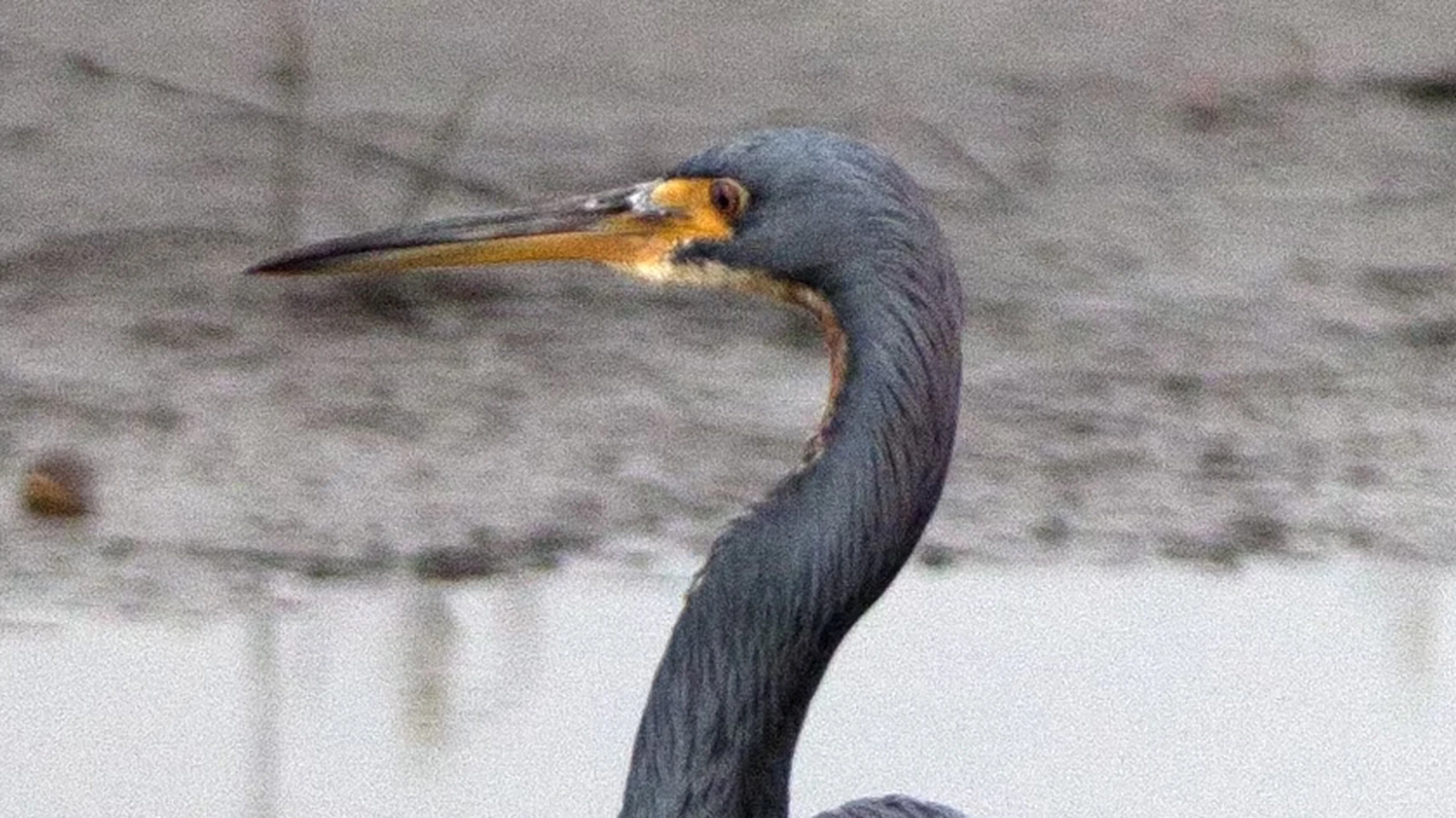
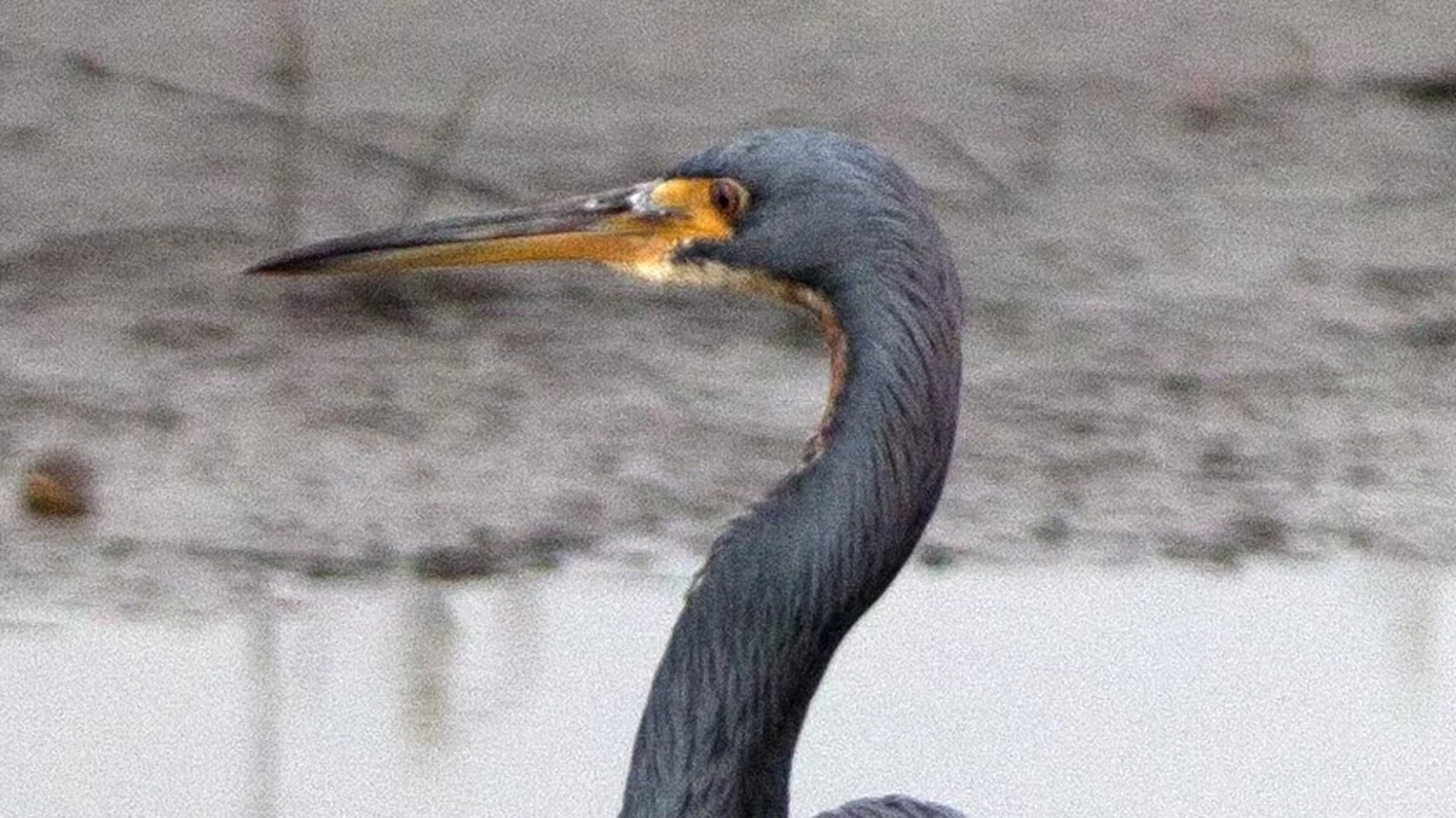
A 3024 × 4032 photo saved as HEIC, then converted on indox.org

HEICthe original
3.0 MB
JPGfrom indox, 29% larger
3.9 MB
A heron's head and beak in the original HEIC photo, enlarged
The same part of the photo in the JPG made by indox, enlarged
Measured on indox.org on 16 October 2026: the HEIC we uploaded and the JPG we downloaded. Drag the handle to compare the same part of the photo, enlarged 2×.

Why use indox to convert HEIC to JPG?

No HEIF or HEVC extensions to install

Windows opens HEIC only after the HEIF Image Extensions and HEVC Video Extensions have been added from the Store. Here the photo is converted on indox infrastructure, so nothing is installed on your PC, and one photo needs no account.

Room for more than one iPhone photo

A set of holiday photos does not have to go through one picture at a time. Add several HEIC files together and you get a separate JPG for each one. You can watch the job on a progress bar and cancel it if the wrong pictures went in.

A JPG you can pass straight on

Once the conversion finishes, download the JPG or share it with a link, which is useful when the photo is meant for a relative whose laptop cannot open HEIC. If an upload form prefers PNG, convert the result again.

What happens to your photo

Stays

  • The main picture, as one JPG for every HEIC file you add
  • Your original HEIC, which is not touched
  • The look of the photo at normal viewing size

Changes

  • The codec: the picture is compressed again, by default at JPEG quality 90
  • File size: the JPG is usually larger than the HEIC
  • Anything beyond the main still image, such as depth data, Live Photo motion or image sequences
  • Colour depth, which is 8 bits per channel in a JPG

How do I convert HEIC to JPG online?

  1. 1

    Add your HEIC photos

    Drop the HEIC photos on the box or choose them from your device; photos in Dropbox, in Google Drive or at a URL can be imported from there. Keep the originals: they are smaller and still hold depth data.

  2. 2

    Confirm JPG, then start the conversion

    Check that JPG is the output format on the converter, then start the conversion. A progress bar shows how far the job has got.

  3. 3

    Download the JPG and check its details

    Save the JPG and open it once. If you rely on the capture date or GPS position, confirm those EXIF fields arrived, and expect a larger file than the HEIC.

What do I get from indox's HEIC to JPG converter?

You hand over a HEIC photo and take away a JPG holding the main still image in 8-bit colour, ready for Windows, older editors, print kiosks and upload forms. Depth maps, HDR gain data and Live Photo motion stay behind, because a JPG has no place for them. The photo travels over HTTPS, and free-tier files are deleted within 24 hours.

  • One JPG for every HEIC photo you add
  • Nothing installed on Windows, no account for a single photo
  • A progress bar for the job, and a way to cancel it
  • Download the JPG, share a link, or convert it again
The indox HEIC to JPG converter: drop a file or choose one to convert it to JPG

What are the limits for HEIC to JPG?

Size

The upload box shows the live size limit before you add a file. Signing in raises it, and paid plans raise it further.

Formats

HEIC in, JPG out. Pick another output on the converter if you need a different format.

Privacy

Files are encrypted in transit over HTTPS and processed on indox infrastructure.

Deletion

Free-tier files are deleted automatically within 24 hours after the job finishes.

Limits worth knowing

  • Both formats are lossy, so the JPG is a second generation of compression. The loss is rarely visible after one conversion, but it is not zero.
  • Depth information and HDR gain data do not survive, so Portrait background blur can no longer be adjusted or removed from the converted file.
  • EXIF details such as capture date, camera model and GPS position can be stored in a JPG too, but check they arrived before relying on them.
  • Expect the JPG to take more space than the HEIC, which adds up quickly across a whole camera roll.

When the result is not what you expected

What you seeWhyWhat to do
The JPG is bigger than the HEICJPEG compression is less efficient than HEIFKeep the HEIC originals for storage and convert only the photos you need to share
Portrait blur can no longer be changedThe depth data stays in the HEIC; the JPG holds only the main pictureEdit the blur in the original HEIC first, then convert
A form wants PNG or a PDFThe JPG is not the format the form listsUse HEIC to PNG instead, or turn the JPG into a PDF with JPG to PDF
The file shows today's dateThe file system date is the day of conversion; the capture time is stored inside the photoLook for the capture date in the photo's details, not in the file list

What do the free and paid plans add?

Free

  • All converters
  • Daily credit refresh
  • Email support

Basic

  • Access to all features
  • AI Extract
  • Priority conversions
  • Email support
Highest priority

Premium

  • Everything in Basic
  • Highest priority queue
  • Larger file limits
  • Priority support

Pay-As-You-Go

  • No subscription
  • Credits never expire
  • Opt-in auto-refill
  • Access to all features
See prices

HEIC vs JPG: what is the difference?

Compared onHEICJPG
StandardHEIF, ISO/IEC 23008-12, first published in 2017JPEG 1, created in 1992
CompressionBetter than JPEG, so the same picture takes less storageOlder and less efficient, so files are larger
Where it opensNewer devices and softwareBroadly compatible with other devices and operating systems
Several imagesOne file can hold single images, collections and sequencesA converted JPG holds one still image
MetadataExif, XMP and ICC colour profiles can be carriedCheck the converted file for the fields you need
Lossless optionLossy and lossless storage are both supportedLossy

Who can use a HEIC to JPG converter?

  • iPhone users sending photos to a PC

    A relative's Windows laptop shows HEIC files as blank icons it cannot open. A JPG copy of each holiday photo opens there with no extensions to install.

  • People filling in upload forms

    Government, bank and job application forms often list JPG and PNG only. Converting the HEIC photo of an ID or receipt gets it past the file picker.

  • Editors working in older software

    Versions of Photoshop, Lightroom and Office released before HEIC support existed cannot import the format. JPG copies load in them, and print kiosks and online photo labs accept them too.

When to use it

  • Sending holiday photos to a relative whose Windows laptop shows HEIC files as blank icons it cannot open.
  • Uploading an ID photo or receipt to a government, bank or job application form that lists JPG and PNG only.
  • Bringing pictures into an older version of Photoshop, Lightroom or Office that was released before HEIC support existed.
  • Ordering prints from a shop kiosk or an online photo lab that rejects anything other than JPG files.

Where can I read more about converting files?

Do it all with indox

View all 123 tools

HEIC to JPG FAQs

Why can't I open HEIC files on Windows?

Windows does not ship with the decoder HEIC needs. The format relies on HEVC compression, which is patent-licensed, so Microsoft offers the HEIF Image Extensions and HEVC Video Extensions as separate Store downloads. Without both, Photos and File Explorer show an error or a blank thumbnail. A JPG copy opens on any Windows version with no add-ons.

Does converting HEIC to JPG lose quality?

Slightly, yes, although you will rarely see it. HEIC and JPG are both lossy, so the picture is decoded and then compressed again with a less efficient codec. At a normal viewing size the two look identical. Differences show up only when zooming in on fine texture, on smooth gradients, or after the JPG has been saved again several times.

Is HEIC better than JPG?

For storage, HEIC is the better format: it keeps similar visual quality in less space and can record deeper colour and depth maps. For sharing, JPG wins because everything opens it. A sensible habit is to keep the HEIC originals on your phone or in a backup and make JPG copies only for the places that demand them.

Will my photo keep its date and location after conversion?

Usually it can, because JPG stores the same EXIF fields HEIC does, including capture time, camera settings and GPS coordinates. Whether every field arrives depends on how the original was written. Note that the created date your computer shows will be the day of conversion; the capture date lives inside the EXIF data, not in the file system.

What happens to a Live Photo when I convert it to JPG?

You get the single key frame and nothing else. A Live Photo is really two files, a HEIC still plus a short MOV clip with sound, linked together by the Photos app. Only the still goes into the JPG, since that format holds exactly one image. To keep the movement, export the Live Photo as a video from your iPhone instead.

How do I stop my iPhone taking HEIC photos?

Open Settings, then Camera, then Formats, and choose Most Compatible. From then on the camera saves JPG, at the cost of larger files. Photos already taken stay as HEIC and still need converting. When you import over USB, the Photos setting Keep Originals stops the iPhone from converting HEIF to JPEG for you.

Can I convert HEIC to JPG on Windows without installing anything?

Yes. Add the HEIC photo to the converter in your browser and download the JPG. Nothing is installed on the PC, and one photo needs no account.

Can I convert many iPhone photos at once?

Yes. Add several HEIC files together and you get a separate JPG for each one, with a progress bar you can cancel.

Is it safe to upload my photos?

The photo travels over HTTPS and files on the free plan are deleted within 24 hours. Your original HEIC stays on your device.