Free PDF to JPG converter

Every page of the document becomes a separate JPG picture you can post, insert in a slide or upload.

Converting PDF to JPG turns each page of the document into its own image, so a ten-page file gives you ten pictures. They can be viewed, posted or inserted anywhere an image is accepted. The pages become pixels in the process, so text in the JPG can no longer be selected, searched or edited.

Transfers use HTTPS, and files converted on the free tier are deleted within 24 hours, so the result is not a long-term archive. Quality depends on the source file, so open the JPG file once before you share it.

Need more PDF options? Open the PDF Converter hub.

FromPDFLossless

PDF (Portable Document Format)

A fixed-layout document format created by Adobe and now an ISO standard. A PDF describes pages using vector text, embedded fonts, line art and images, so it prints identically everywhere and its text can be selected, searched and read aloud.

ToJPGLossy

JPEG (Joint Photographic Experts Group)

A compressed raster image format designed for photographs. A JPG is one flat picture with no pages, no text layer and no fonts, which is why it can be viewed, embedded and posted in places where a document file is not allowed.
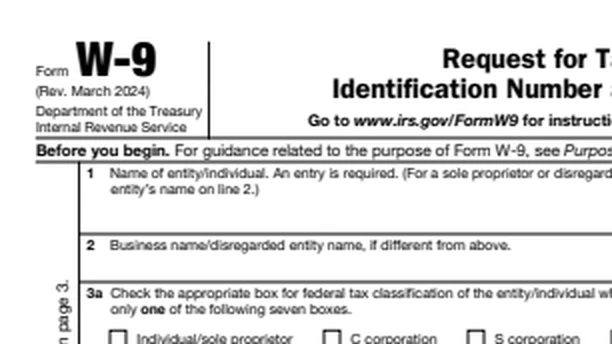
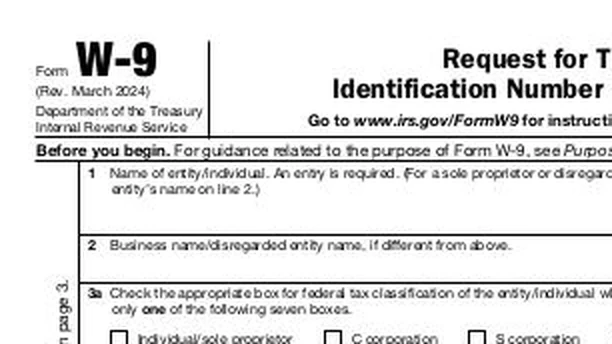
IRS Form W-9 (public domain, 6 pages), converted on indox.org

PDFthe original
141 KB
JPGfrom indox, 12% smaller
124 KB
The top of Form W-9 in the original PDF file, enlarged
The same part in the JPG file made by indox, enlarged
Measured on indox.org on 16 October 2026: the file we uploaded and the file we downloaded. Drag the handle to compare the same part.

Why use indox to convert PDF to JPG?

No screenshots or cropping

You do not need to open the PDF, take a screenshot and crop it to get a picture of a page. Add the document here and each page is rendered as a JPG; nothing has to be installed, and a single document converts without an account.

One image per page, in page order

A JPG cannot contain several pages, so every page of the PDF is saved as its own image, in page order. Use one page in a slide or chat message, or keep the whole set.

Clear handling for confidential PDFs

PDFs are often contracts or records, so how a file is handled matters. Your PDF is sent over HTTPS and processed on indox infrastructure, and on the free tier it is deleted within 24 hours. The JPGs remain as readable as the original pages to anyone who receives them.

What happens to your PDF pages

Stays

  • Your original PDF, which is not touched
  • What each page looks like, drawn at a resolution indox sets
  • The order of the pages, in the numbered file names

Changes

  • Pages: every page becomes its own JPG, and a PDF with several pages comes back as a ZIP of numbered images
  • Text and links: pages are drawn to pixels, so text can no longer be selected or searched and links and form fields stop working
  • Colour: each page is saved as a plain RGB picture
  • Quality: JPG is lossy, and indox saves it at a quality it sets

How do I convert PDF to JPG online?

  1. 1

    Add your PDF document

    Drop the PDF on the box or select it from your device; the box shows the size limit before you add anything. You can also import a document straight from Google Drive, Dropbox or a URL.

  2. 2

    Set JPG as the output, then convert

    Leave the output format on JPG and start the conversion. For pages that are mostly small text, tables or diagrams, PNG is often the cleaner output.

  3. 3

    Download the JPGs and zoom in on the text

    Download the images and open one at full size. Small type and thin lines can pick up a faint JPEG halo, so check that the text is still easy to read.

What do I get from indox's PDF to JPG converter?

You get a set of JPG images, one for each page, that can be viewed, posted or inserted anywhere a picture is accepted. The pages become pixels, so text can no longer be selected, searched or read by a screen reader, and links and form fields stop working. Keep the PDF for anything that must stay editable or searchable.

  • One JPG for every page of the PDF
  • Images returned in page order
  • No PDF software to install
  • One document goes through without an account
  • A progress bar while the job runs, and a cancel option
The indox PDF to JPG converter: drop a file or choose one to convert it to JPG

What are the limits for PDF to JPG?

Size

The upload box shows the live size limit before you add a file. Signing in raises it, and paid plans raise it further.

Formats

PDF in, JPG out. Pick another output on the converter if you need a different format.

Privacy

Files are encrypted in transit over HTTPS and processed on indox infrastructure.

Deletion

Free-tier files are deleted automatically within 24 hours after the job finishes.

Limits worth knowing

  • Accessibility is reduced. People using screen readers cannot read a JPG page, and search engines or document tools cannot index its contents.
  • Pages dominated by small text, tables or fine diagrams often look cleaner as PNG, since JPG compression is tuned for photographic tones, not hard edges.
  • A long document yields a long list of image files, one per page, which is clumsier to send and keep in order than the single PDF.
  • Turning the images back into a PDF later does not restore the text layer. The pages stay pictures unless the text is recognised again.

When the result is not what you expected

What you seeWhyWhat to do
I got a ZIP, not a JPGA PDF with more than one page becomes one image per page, packed in a ZIPOpen the ZIP, where each page is a numbered file. Use Extract pages first if you only need some pages
Small text looks soft or roughJPG is a lossy encoding, so fine edges such as small text can pick up compression artefactsConvert to PDF to PNG instead, which does not discard picture data
I need the words, not a picture of themA JPG holds pixels onlyUse PDF to DOCX to get text you can edit
I want the images back in a single PDFEach JPG is a separate fileCombine them with JPG to PDF

What do the free and paid plans add?

Free

  • All converters
  • Daily credit refresh
  • Email support

Basic

  • Access to all features
  • AI Extract
  • Priority conversions
  • Email support
Highest priority

Premium

  • Everything in Basic
  • Highest priority queue
  • Larger file limits
  • Priority support

Pay-As-You-Go

  • No subscription
  • Credits never expire
  • Opt-in auto-refill
  • Access to all features
See prices

PDF vs JPG: what is the difference?

Compared onPDFJPG
What it isA format for formatted, page-oriented documents (ISO 32000-1)A family of image compression codecs (ISO/IEC 10918 and 14495)
PagesOne file can hold many pagesOne image per file
ContentCan hold text, images and graphicsContinuous-tone images; it does not work well with bitonal or palette-colour images
CompressionDepends on the content insideLossy modes use a discrete cosine transform on 8-by-8-pixel blocks

Who can use a PDF to JPG converter?

  • Social media and marketing staff

    A flyer, certificate or menu cannot be shared as a picture while it is a PDF. As a JPG it posts on social media like any photo.

  • Presenters and report writers

    Drop a single page of a report into a slide deck, chat message or web page as an image, so readers see it without opening a document.

  • People facing photo-only upload forms

    Some forms take photos but refuse PDF attachments. Converting a scanned document to JPG gets each page through as an image.

When to use it

  • Posting a flyer, certificate or menu on social media, where a PDF cannot be shared as a picture.
  • Dropping a single page of a report into a slide deck, chat message or web page as an image.
  • Uploading a scanned document to a form that takes photos but refuses PDF attachments.
  • Pulling the pages of a scanned photo album or brochure out as individual pictures for editing.

Where can I read more about converting files?

Sources

Facts checked on October 16, 2026

Do it all with indox

View all 123 tools

PDF to JPG FAQs

Do I get one JPG for the whole PDF or one per page?

One per page. A JPG is a single flat image and cannot contain several pages, so each page of the PDF is rendered into its own file. A three-page contract gives three images, in page order. If you need everything in one picture, the pages have to be stitched together afterwards in an image editor.

Can I still copy or search the text after converting?

No. Rendering a page as a JPG replaces its real characters with coloured pixels that only look like letters. Selecting, copying, searching and screen reading all depend on the text layer the PDF had, and an image has none. To get editable words back out of a JPG you would need to run optical character recognition on it separately.

Does converting PDF to JPG reduce quality?

It can, depending on the page. Photographs inside a PDF generally come through looking the same. Vector text and drawings lose their unlimited sharpness because they are fixed at one resolution, and JPEG compression may add slight fuzz around small letters. At normal reading size this is minor; zoomed in, the difference from the original PDF is clear.

Why would I convert a PDF to JPG instead of sharing the PDF?

Because many places accept pictures but not documents. Social networks, photo galleries, slide backgrounds and plenty of web forms display a JPG inline, while a PDF shows up as a download link or is rejected. An image also previews instantly on phones without a reader app. For anything that must stay editable or searchable, keep sending the PDF.

Should I choose JPG or PNG for PDF pages?

Pick JPG for pages that are mostly photographs or scans, and PNG for pages that are mostly text, tables or diagrams. JPG keeps photographic pages small with little visible cost. PNG is lossless, so letters and lines stay clean, though files are larger. For a mixed document shared casually, JPG is normally the practical choice.

Is it safe to convert a confidential PDF online?

It depends on the service, so check how files are handled before uploading anything sensitive. Here the upload travels over HTTPS and files on the free tier are deleted automatically within 24 hours. For contracts or medical records, remember too that the resulting images are just as readable as the original pages to anyone who receives them.