Free XLSX to PDF converter

Hand over your workbook as PDF pages that open without Excel and show the results, not the formulas behind them.

Converting XLSX to PDF turns a live workbook into fixed pages that anyone can open without Excel and nobody can accidentally change. Every formula is replaced by the value it displayed, and the sheet is cut into pages according to the workbook's own print settings, so a wide sheet may split across several pages.

Transfers use HTTPS, and files converted on the free tier are deleted within 24 hours, so the result is not a long-term archive. Quality depends on the source file, so open the PDF file once before you share it.

Need more PDF options? Open the PDF Converter hub.

FromXLSXLossless

XLSX (Office Open XML Workbook)

The Excel workbook format introduced with Office 2007, built on Office Open XML. One file holds any number of worksheets, each a grid of cells with values, formulas, number formats and styling, plus charts, pivot tables and print settings.

ToPDFLossless

PDF (Portable Document Format)

A paginated, fixed-layout format (ISO 32000) designed so a document prints the same everywhere. It has pages of a set size and no concept of cells, rows or formulas, only text and lines drawn at fixed positions.
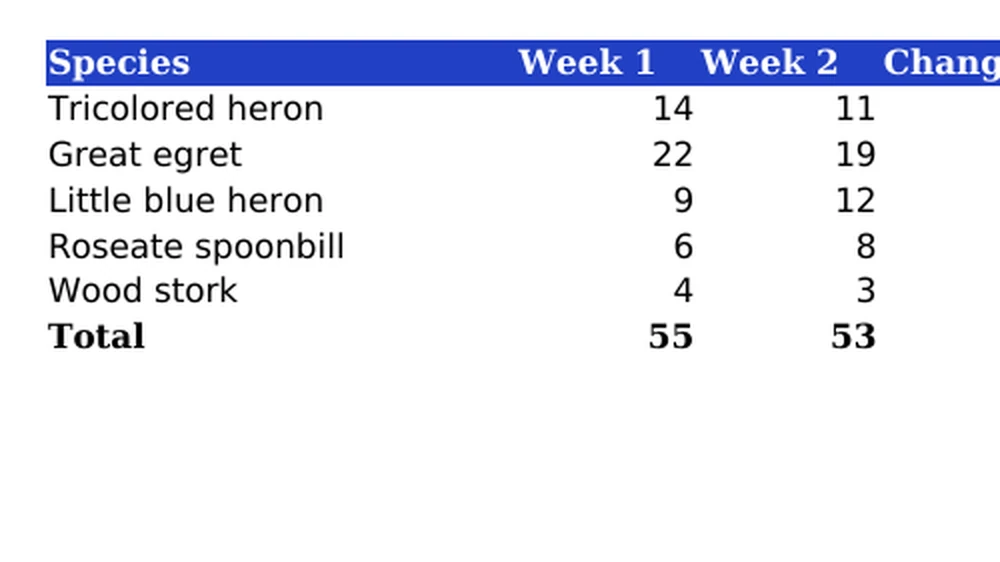
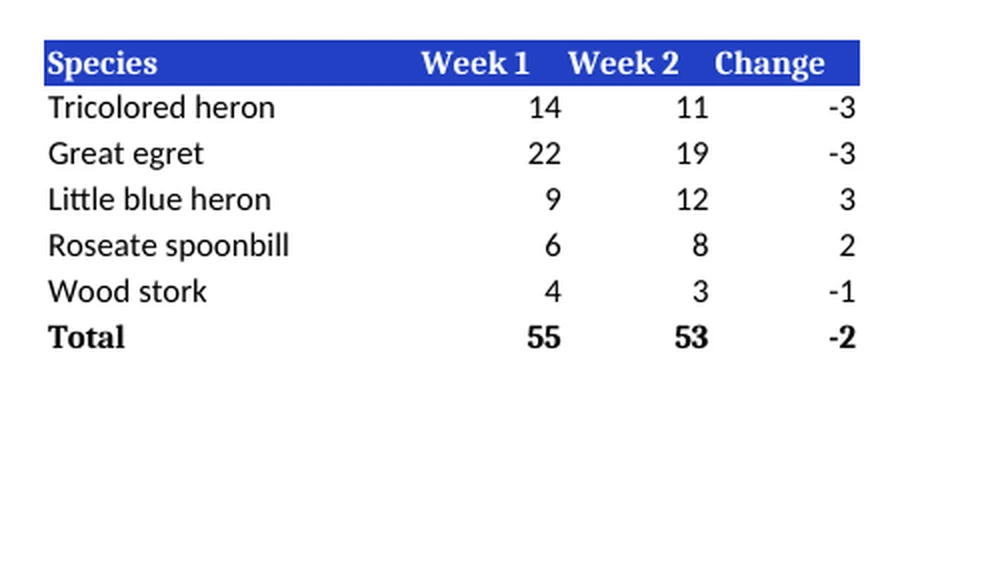
A small spreadsheet with a styled header, formulas and a total row, converted on indox.org

XLSXthe original
6 KB
PDFfrom indox, 330% larger
25 KB
The count table in the original XLSX file, enlarged
The same part in the PDF file made by indox, enlarged
Measured on indox.org on 16 October 2026: the file we uploaded and the file we downloaded. Drag the handle to compare the same part. The spreadsheet is drawn by LibreOffice.

Why use indox to convert XLSX to PDF?

Figures on the page, formulas left behind

Each cell appears as it was displayed, with its number format and rounding, and no calculation behind it. A client reading an invoice or quote sees the totals and cannot alter the figures or read the formulas.

Page breaks follow your workbook's print setup

The print area, paper size, orientation and scaling saved in the XLSX decide which columns and rows land on each page. Set them in Excel before you upload, because they travel inside the file.

Readable on a phone without a spreadsheet app

Spreadsheets are awkward to read on a small screen, while a PDF opens directly. Download the result or send a share link to whoever needs the numbers; converting one workbook takes no account and no install.

What happens to your workbook

Stays

  • Your original XLSX, which is not touched
  • The values and text as the sheet shows them

Changes

  • Formulas: a PDF page holds the displayed result, with no calculation behind it
  • Grid to pages: a worksheet is a grid of cells, and the converter cuts it into pages
  • Editing: the PDF has pages, not cells, so you cannot change a number and recalculate

How do I convert XLSX to PDF online?

  1. 1

    Add the workbook with its print setup saved

    Set the print area, orientation and scaling in Excel and save. The saved workbook can then be chosen from your device or imported from Dropbox or Google Drive.

  2. 2

    Check the output is PDF, then convert

    Start the conversion once PDF shows as the output format. If you realise you added the version with the wrong print area, cancel the job while the progress bar is still running.

  3. 3

    Download the PDF and look for split columns

    Check for columns pushed onto extra pages, cells printed as hash signs and sheets you did not expect. Adjust the print settings in Excel and convert again if needed.

What do I get from indox's XLSX to PDF converter?

You get a paginated PDF, typically with each visible sheet in order, and with text that normally stays selectable and searchable in a PDF reader. Hidden rows, columns and sheets are normally left out, and sorting, filtering and pivot tables stop working because only the visible result is kept. The workbook is converted on indox infrastructure, not in your copy of Excel, so fonts, column widths or page breaks can differ slightly from Excel's own print preview.

  • Displayed values where the formulas used to be
  • Pages cut by the print settings stored in the workbook
  • Charts frozen as they looked at conversion
  • Opens without Excel on any device that reads PDF
  • Sent over HTTPS, and deleted within 24 hours on the free tier
The indox XLSX to PDF converter: drop a file or choose one to convert it to PDF

What are the limits for XLSX to PDF?

Size

The upload box shows the live size limit before you add a file. Signing in raises it, and paid plans raise it further.

Formats

XLSX in, PDF out. Pick another output on the converter if you need a different format.

Privacy

Files are encrypted in transit over HTTPS and processed on indox infrastructure.

Deletion

Free-tier files are deleted automatically within 24 hours after the job finishes.

Limits worth knowing

  • Columns that do not fit the page width spill onto extra pages unless the workbook is set to fit to one page wide, which shrinks the text instead.
  • Hidden rows, columns and sheets are normally left out, and cells too narrow for their number can print as a row of hash signs.
  • Workbooks with several sheets typically print each visible sheet in order, though exactly which sheets are included depends on the converter.
  • Rendering engines differ. A sheet converted outside Excel can show slightly different fonts, column widths or page breaks from Excel's own print preview.

When the result is not what you expected

What you seeWhyWhat to do
Columns spill onto extra pagesThe sheet is wider than a page, so the converter splits itSet the orientation and the scale to fit in the workbook's page layout, then convert again
The formulas are goneA PDF holds formatted pages, and the formulas stay in the XLSXShare the PDF and keep the XLSX as the file you work in
I need the numbers as dataA PDF page is for reading, not for processingUse XLSX to CSV to get the values as plain text

What do the free and paid plans add?

Free

  • All converters
  • Daily credit refresh
  • Email support

Basic

  • Access to all features
  • AI Extract
  • Priority conversions
  • Email support
Highest priority

Premium

  • Everything in Basic
  • Highest priority queue
  • Larger file limits
  • Priority support

Pay-As-You-Go

  • No subscription
  • Credits never expire
  • Opt-in auto-refill
  • Access to all features
See prices

XLSX vs PDF: what is the difference?

Compared onXLSXPDF
What it isA workbook of one or more worksheets (ISO 29500)A format for formatted, page-oriented documents (ISO 32000-1)
LayoutA rectangular grid of cellsPages
FormulasA cell can hold a value or a formula, usually with a cached valueNo formulas; the page holds formatted content
RoleA container for data, and for formulas that analyse itGenerally a final-state format for delivery to end users

Who can use a XLSX to PDF converter?

  • Freelancers and small businesses

    They email an invoice or quote as a PDF, so the client sees the totals but cannot change the figures or read the formulas.

  • Finance teams preparing board packs

    A budget or financial statement has to join a board pack that is circulated and archived as PDF, not as a live workbook.

  • Managers printing rotas and price lists

    A timetable, rota or price list needs to come out with the same page breaks on any printer.

When to use it

  • Emailing an invoice or quote so the client sees the totals but cannot alter the figures or read the formulas.
  • Attaching a budget or financial statement to a board pack that is circulated and archived as PDF.
  • Printing a timetable, rota or price list with the same page breaks on any printer.
  • Sharing results with someone on a phone, where spreadsheets are awkward to read and a PDF opens directly.

Where can I read more about converting files?

Sources

Facts checked on October 16, 2026

Do it all with indox

View all 123 tools

XLSX to PDF FAQs

How do I fit an Excel sheet on one page when converting to PDF?

Set it in the workbook before converting. In Excel, open Page Layout and under Scale to Fit choose 1 page wide (and 1 page tall if needed), or switch the orientation to landscape. That scaling is stored inside the XLSX file and is what determines the page breaks. Very large sheets become too small to read.

Are formulas kept when I convert XLSX to PDF?

No, only their results. A PDF has no calculation engine, so each formula cell is written out as the number or text it was showing, formatted the way the cell was formatted. Anyone reading the PDF cannot see how a total was calculated. Keep the XLSX file if the working needs to stay available.

Why is my spreadsheet cut off or split across pages in the PDF?

The sheet is wider or longer than the paper size set in the workbook. Spreadsheet printing fills a page with as many columns as fit, then continues with the remaining columns on later pages. Narrower margins, landscape orientation, a smaller scale or a defined print area in the source file all reduce the splitting.

Does the PDF include every sheet in the workbook?

Typically every visible worksheet is printed, one after another in tab order, and hidden sheets are skipped. This varies between converters and can also be affected by print areas defined on individual sheets. If you need only one sheet in the PDF, the dependable method is to save a copy of the workbook that contains just that sheet.

Can I convert the PDF back to Excel later?

You can, but expect to tidy the result. The PDF stores text at positions on a page, not cells, so rows and columns have to be guessed from the alignment, and formulas are gone for good. Numbers may come back as text. Treat the PDF as a copy for reading and keep the original workbook.

Will hidden columns or rows show up in the PDF?

Normally they will not. Printing follows what is visible on the sheet, so anything hidden or filtered out is omitted from the pages. That is convenient for layout, but it is not a security measure for the source file: the hidden data is still inside the XLSX if you send that as well.

Indox | XLSX to PDF Converter: Excel Sheets as Fixed Pages