Instruction paragraph
A short paragraph on notarizing the form, sending it through the DUT with a copy of valid photo identification, or mailing it to the address in the notice.
15122
Notarized Centralized Authorization File (CAF) Information Verification
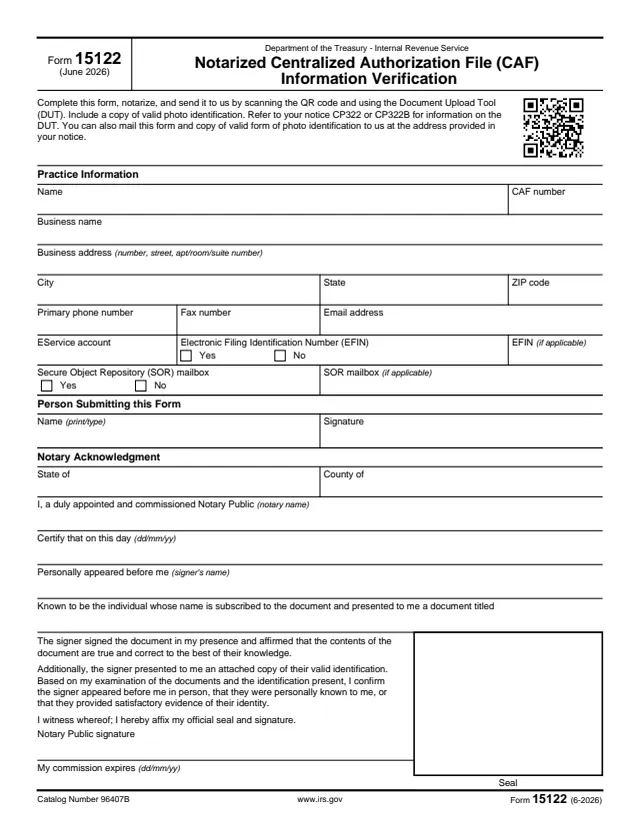
Form 15122, Notarized Centralized Authorization File (CAF) Information Verification, is a one-page Department of the Treasury, Internal Revenue Service form dated June 2026. The form says to complete it, notarize it, and send it to the IRS by scanning the QR code and using the Document Upload Tool (DUT), with a copy of valid photo identification. It refers to notice CP322 or CP322B for information on the DUT, and says the form and the copy of photo identification can also be mailed to the address provided in the notice.
The form asks for practice information tied to a CAF number, the name and signature of the person submitting it, and a notary acknowledgment completed by a notary public.
You can fill it out free in your browser on this page and download the result without an account.
A short paragraph on notarizing the form, sending it through the DUT with a copy of valid photo identification, or mailing it to the address in the notice.
Name, CAF number, business name, business address, city, state and ZIP code, primary phone number, fax number and email address.
An EService account field, Yes or No boxes for an Electronic Filing Identification Number (EFIN) with a space for the EFIN if applicable, and Yes or No boxes for a Secure Object Repository (SOR) mailbox with a space for it if applicable.
Name (print/type) and signature.
State and county, the notary's name, the date (dd/mm/yy), the signer's name, the title of the document presented, the notary's statement on the signer's identity, the notary public signature, the commission expiration date and the seal.
Enter the name, CAF number, business name and address, and the phone, fax and email details.
Fill in the EService account field, check Yes or No for the EFIN and for the SOR mailbox, and enter the EFIN and SOR mailbox if applicable.
Print or type the name of the person submitting the form. The notary acknowledgment says the signer signed the document in the notary's presence.
The notary fills in the state and county, the notary's name, the date, the signer's name and the document title, then signs, enters the commission expiration date and affixes the seal.
Include a copy of valid photo identification. The acknowledgment says the signer presented an attached copy of their valid identification.
Scan the QR code and use the DUT, or mail the form and the copy of photo identification to the address provided in the notice.
You get the real form, filled in a browser tab, with nothing standing between you and the finished PDF.
The form says to send it by scanning the QR code and using the Document Upload Tool (DUT), and to refer to notice CP322 or CP322B for information on the DUT.
The form says it can also be mailed with the copy of photo identification to the address provided in the notice. The PDF prints no address or deadline of its own.
The form is notarized before it is sent. The notary records a commission expiration date and affixes a seal.
A copy of valid photo identification goes with the form, whether it is uploaded or mailed.
The form is completed by the person whose practice information and CAF number it verifies, then notarized by a notary public, and it goes to the IRS.
No tool matches that search.
Centralized Authorization File, as the form's title says. The form asks for the CAF number in the Practice Information block.
The form says to scan the QR code and use the Document Upload Tool (DUT), or to mail it to the address provided in notice CP322 or CP322B, with a copy of valid photo identification.
Yes. The title says Notarized, and the Notary Acknowledgment is completed, signed and sealed by a notary public.
The form says to include a copy of valid photo identification.
The form refers to notice CP322 or CP322B.