Instructions (a) to (e)
One form for each savings account, the employee initiates it and completes part A in triplicate, the financial organization completes part B in triplicate, and the employee distributes copies as designated.
SF1198
Request by Employee for Allotment of Pay for Credit to Savings Account with a Financial Organization
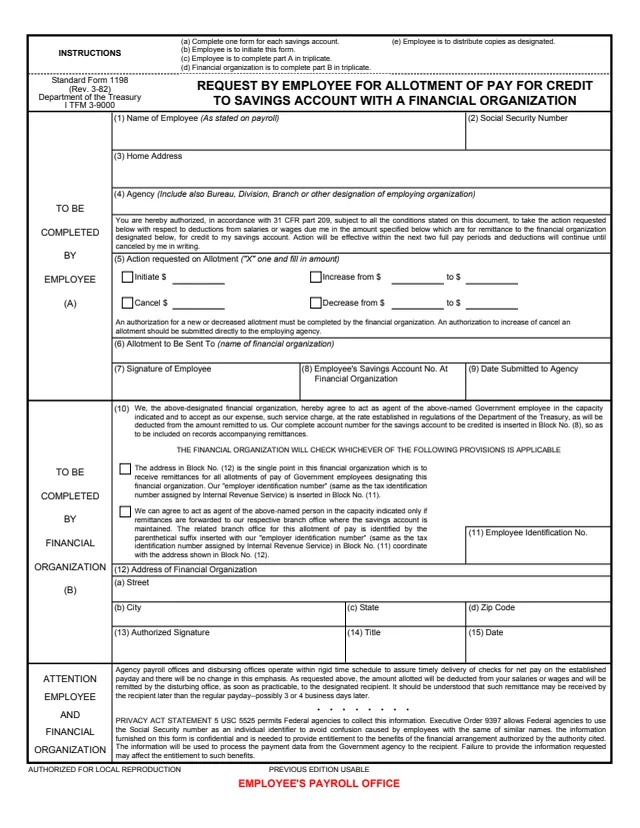
Standard Form 1198 (SF 1198), Request by Employee for Allotment of Pay for Credit to Savings Account with a Financial Organization, is a U.S. Department of the Treasury form. The header names the Department of the Treasury and cites I TFM 3-9000, and the employee's authorization cites 31 CFR part 209. GSA hosts a copy in its forms library.
The employee completes part A, blocks 1 to 9, to initiate, increase, decrease or cancel an allotment of pay for credit to a savings account. The financial organization completes part B, blocks 10 to 15, agreeing to act as the employee's agent. The instructions say to complete one form for each savings account, with each part completed in triplicate.
The PDF prints three copies, labeled EMPLOYEE'S PAYROLL OFFICE, FINANCIAL ORGANIZATION'S COPY and EMPLOYER'S COPY. The footer says it is authorized for local reproduction and that the previous edition is usable. You can fill it out free in your browser on this page and download the result without an account.
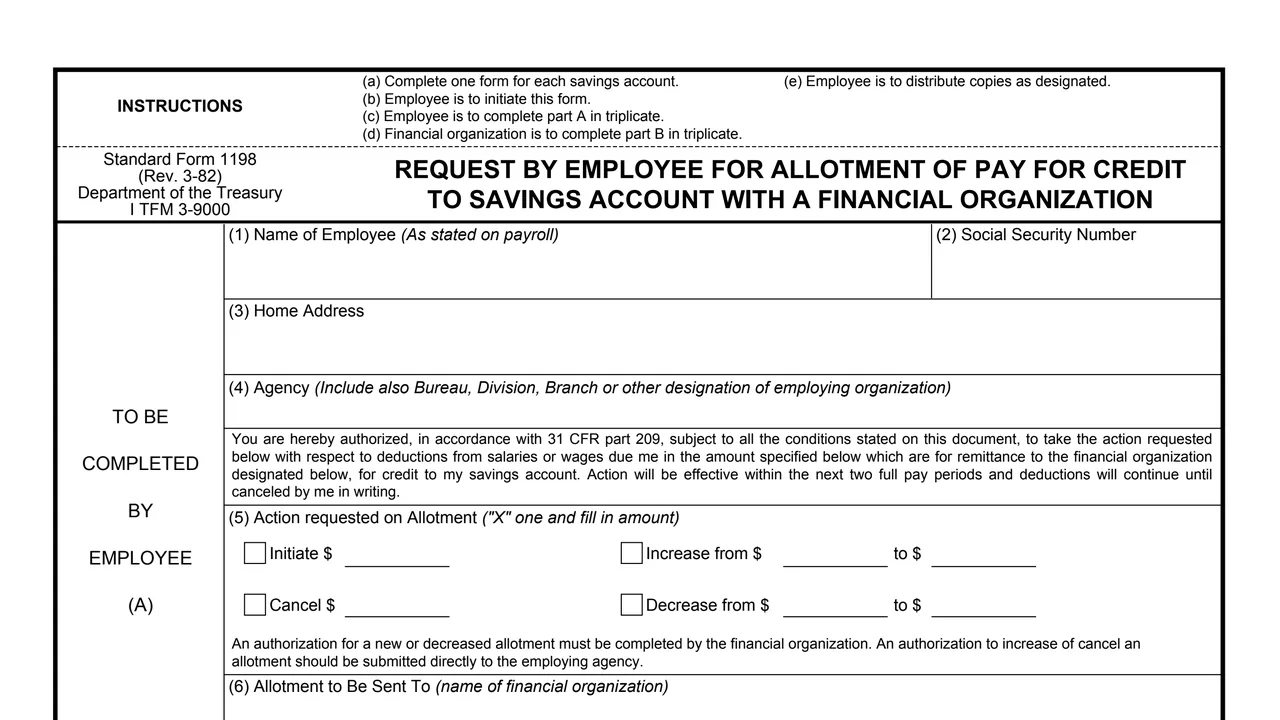
One form for each savings account, the employee initiates it and completes part A in triplicate, the financial organization completes part B in triplicate, and the employee distributes copies as designated.
Name of employee as stated on payroll, Social Security number, home address, and agency, including bureau, division, branch or other designation of the employing organization.
Mark one with an X and fill in the amount: initiate, increase from and to, cancel, or decrease from and to.
Name of the financial organization, signature of the employee, the employee's savings account number at the financial organization, and the date submitted to the agency.
The agent agreement, a choice between a single remittance address and branch office remittances, block 11 for the number the provisions call the employer identification number, the address, an authorized signature, title and date.
A note on when remittances arrive, addressed to the employee and financial organization, and a Privacy Act statement citing 5 USC 5525 and Executive Order 9397.
One page, printed in three labeled copies.
Enter your name as stated on payroll, Social Security number, home address and agency in blocks 1 to 4.
In block 5, mark one action with an X and fill in the amount. The authorization says action will be effective within the next two full pay periods and deductions will continue until canceled in writing.
Enter the financial organization in block 6, sign block 7, and enter the date submitted to the agency in block 9.
The form says an authorization for a new or decreased allotment must be completed by the financial organization. Block 10 says it inserts its complete account number in block 8 and checks the provision that applies.
The form says an authorization to increase or cancel an allotment should be submitted directly to the employing agency.
The instructions say the employee is to distribute copies as designated. The copies are labeled EMPLOYEE'S PAYROLL OFFICE, FINANCIAL ORGANIZATION'S COPY and EMPLOYER'S COPY.
You get the real form, filled in a browser tab, with nothing standing between you and the finished PDF.
The PDF prints no address. The copies are labeled for the employee's payroll office, the financial organization and the employer, and increases or cancellations go directly to the employing agency, the form says.
The authorization says action will be effective within the next two full pay periods and deductions will continue until canceled by the employee in writing.
The form says the amount allotted is remitted as soon as practicable, and may be received by the recipient later than the regular payday, possibly 3 or 4 business days later.
In block 10 the financial organization accepts as its expense a service charge at the rate established in regulations of the Department of the Treasury, deducted from the amount remitted. The form prints no rate.
The statement says 5 USC 5525 permits Federal agencies to collect this information and Executive Order 9397 allows use of the Social Security number as an identifier. It says failure to provide the information may affect the entitlement to such benefits.
The instructions at the top of the form split the work between the employee and the financial organization.
No tool matches that search.
The header names the Department of the Treasury and cites I TFM 3-9000, with the edition Rev. 3-82. GSA hosts a copy in its forms library.
The instructions say the employee initiates the form and completes part A in triplicate, and the financial organization completes part B in triplicate.
The instructions say to complete one form for each savings account.
The authorization says action will be effective within the next two full pay periods and deductions will continue until canceled by the employee in writing.
The form says an authorization to increase or cancel an allotment should be submitted directly to the employing agency. A new or decreased allotment is completed by the financial organization.
The form says the remittance may be received by the recipient later than the regular payday, possibly 3 or 4 business days later.
Block 10 says the financial organization accepts as its expense a service charge at the rate established in Department of the Treasury regulations, deducted from the amount remitted to it. The form prints no rate.