The same pages on every device
Word recalculates line and page breaks from the fonts and printer settings on each computer. The PDF stores fixed positions instead, so a recruiter on a phone sees the same pages you see in the downloaded PDF.
Send your Word document as a PDF that shows the same pages on a phone, a Mac or a print shop's machine.
Converting DOCX to PDF freezes a Word document at the point it was laid out: line breaks, page breaks, margins and fonts are fixed, so the PDF looks the same on a phone, a Mac or a print shop's machine. The one thing to know is that the result is meant for reading and printing, not further editing.
Transfers use HTTPS, and files converted on the free tier are deleted within 24 hours, so the result is not a long-term archive. Quality depends on the source file, so open the PDF file once before you share it.
Need more PDF options? Open the PDF Converter hub.
DOCX (Office Open XML Document)
The default Microsoft Word format since Word 2007, a ZIP package of XML parts defined by the Office Open XML standard. Text reflows to fit the page, printer and fonts available, so the same file can paginate differently on two computers.
PDF (Portable Document Format)
A fixed-layout document format published as ISO 32000. Each page records the exact position of every character, image and line, usually with the fonts embedded, so it displays and prints identically in any reader and is awkward to edit.
A one-page Word file with a heading, a table and a photo, converted on indox.org
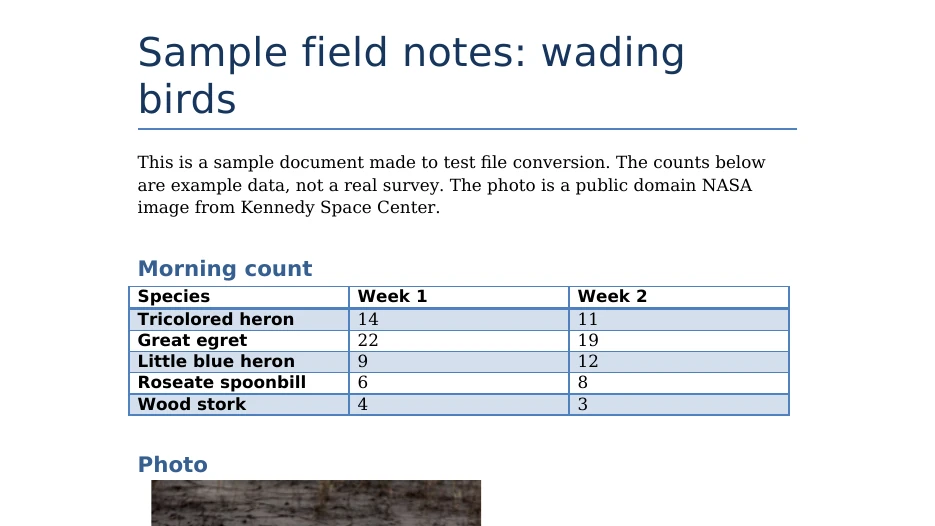
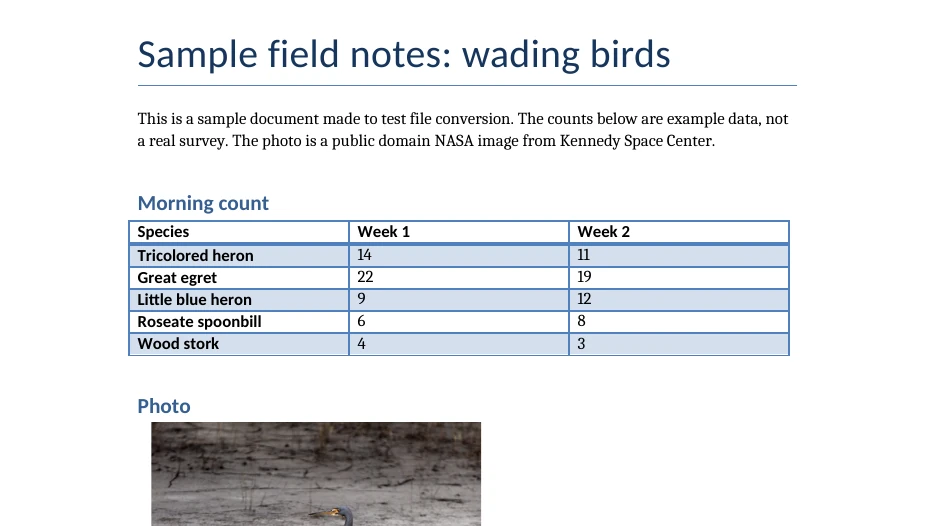
Word recalculates line and page breaks from the fonts and printer settings on each computer. The PDF stores fixed positions instead, so a recruiter on a phone sees the same pages you see in the downloaded PDF.
Web addresses and email links normally stay clickable in the PDF, and headings built with Word's heading styles commonly become bookmarks. Open the downloaded file once and click the links you depend on.
Add a CV, cover letter and supporting documents together from your device, Dropbox, Google Drive or a URL. Each DOCX becomes its own PDF, ready for a portal that rejects Word files.
Accept or reject tracked changes in Word and save, so no markup is drawn onto the pages, then drop the saved DOCX on the box.
Once the output reads PDF, start the conversion, which is the moment the layout is fixed. The progress bar shows the job, and it can be cancelled if you remember a late edit.
Compare the PDF's page count with the Word file. A different number usually means a font was substituted, so check where lines and pages now break.
You get a PDF made for reading and printing, with line breaks, page breaks and margins fixed at the moment of conversion. Because the conversion runs on indox infrastructure and not on your computer, a decorative or purchased font that is missing there may be replaced by a similar one. Macros and embedded audio or video do not work in the PDF, and tracked changes are not kept as review data. Keep the DOCX as the copy you edit.
The upload box shows the live size limit before you add a file. Signing in raises it, and paid plans raise it further.
DOCX in, PDF out. Pick another output on the converter if you need a different format.
Files are encrypted in transit over HTTPS and processed on indox infrastructure.
Free-tier files are deleted automatically within 24 hours after the job finishes.
| What you see | Why | What to do |
|---|---|---|
| Lines wrap differently and pages break in new places | A font used in the document is missing on the converting machine and a substitute has different widths | Switch the document to a widely installed font and convert again |
| A screen reader reads the PDF poorly | A PDF has logical structure only when tagging is added during creation | Check the result with accessibility tools before you rely on it |
| The text cannot be edited | A PDF stores fixed positions on pages, and DOCX is the format meant for editing | Keep the DOCX as your master, or go back with PDF to DOCX |
Photos and scans as one document
Excel sheets ready to send or print
Ebooks with fixed pages
Web pages saved as a document
| Compared on | DOCX | |
|---|---|---|
| Made for | Word-processor documents, with layout and formatting as the author intended | The layout of page-oriented documents |
| Structure | Styles for headings, automatically generated tables of contents and indexes | Logical structure only when tagging is added during creation |
| Fonts | Font face and size are set in each run of text | Faithful rendering requires that fonts be embedded |
| Standard | ISO/IEC 29500, ECMA-376 (Office Open XML) | ISO 32000-1:2008 for PDF 1.7 |
Facts checked on October 16, 2026
No tool matches that search.
Usually not in any way you would notice, because the purpose of the conversion is to lock the formatting in place. Differences appear when a font used in the document is missing and gets substituted, or when the document relied on a specific printer's margins. Compare the page count of the PDF with the Word file as a quick check.
Yes, in most cases links survive. Web addresses and email links normally stay clickable, and cross-references or table of contents entries often become internal jumps. Headings built with Word's heading styles commonly turn into PDF bookmarks. Links typed as plain text without a hyperlink attached depend on the PDF reader recognising them.
They are not kept as editable review data, because PDF has no equivalent of Word's revision tracking. If the document is showing markup, the strike-throughs, coloured insertions and margin balloons are usually drawn onto the page as ordinary content. If markup is hidden, they are left out. Accept or reject changes in Word first to be certain.
The usual cause is a font substitution. When the converter lacks a font the document uses, it picks a replacement with slightly different character widths, so lines wrap sooner or later and the pagination drifts. Common fonts such as Arial, Times New Roman and Calibri (or metric-compatible equivalents) rarely trigger this, while decorative or purchased fonts often do.
Only with difficulty. A PDF stores positioned text rather than paragraphs, so changing a sentence in a PDF editor does not reflow the rest of the page the way Word does. Small corrections are possible in tools such as Adobe Acrobat. For anything larger, keep the DOCX as your master copy, edit there and convert again.
It depends on the content. DOCX is ZIP-compressed XML, so a text-only document is already tiny, and its PDF is often larger because fonts are embedded. A document full of photographs can come out smaller as a PDF if the images are recompressed along the way. Expect the same order of magnitude in either direction.
Drop files here
Add several at once. Documents, images, video and audio.